Program
Panel 1 Program of the BEMGen tab: 9 components and 1 parameter. Back to the component reference.
| Name | Nickname | Kind | |
|---|---|---|---|
 |
Construction JSON | CJson |
component |
 |
DOE Program Map | DoeMap |
component |
 |
DOE Reference Program | DOEProg |
component |
 |
Load | Load |
component |
 |
Mix Programs | Mix |
component |
 |
Program JSON | PJson |
component |
 |
Program Preset | Preset |
component |
 |
Schedule | Sch |
component |
 |
Schedule Draw | SDraw |
component |
 |
Any Program Preset | AnyP |
parameter |
Construction JSON
Component · nickname CJson · GUID b2802511-fee7-49ab-bdcb-9329ce293461 · exposure primary
A construction set from the atlas's construction JSON for Convert2IDF's Construction input. A unified document (building-level equivalent 4.0.0, atlas releases 2.3.0 and 2.4.0) gives one layered construction per envelope role with its surface properties, the window's simple glazing and solar multiplier, the mass data checked against the shared mass contract, the fixed natural air changes as infiltration, and the source's foundation and ground methods, read with every reference resolved inside the document. A detailed document (construction_set 5.0.0) is read with every assignment rule, its conditions, and its foundations, listed in Roles, as evidence; BEMGen converts only unified whole-building documents, and a single-dwelling set (scope whole_dwelling) is refused. The text is checked against its schemas and the contract's rules before anything is made. The solve reads no file or network: connect the JSON text itself, for example from a Panel, or take a set and context from the atlas site (https://energy-atlas.github.io/archetype-atlas/) with Get from Atlas at the bottom of the component, which uses the network only when clicked and stores the unified document in the JSON input; the atlas's residential source-model construction documents are not read. At conversion, a role the JSON marks not applicable but the building needs is an error unless Convert2IDF's Fill From Example is on. The ground floors take the set's own GroundFloor method: an F-factor floor (one Construction:FfactorGroundFloor per area and exposed perimeter, on GroundFCfactorMethod, with ground temperatures from Convert2IDF's Weather file, which it then needs) or layered ground (its layers on Ground, at 18 °C every month); a Kiva or C-factor ground cannot be placed on BEMGen's geometry and stops the conversion.
Inputs
| Name | Nickname | Type | Access | Optional | Default | Description |
|---|---|---|---|---|---|---|
| JSON | J |
Text | item | no | – | The unified construction JSON text (kind building_level_equivalent, schema 4.0.0, atlas releases 2.3.0 and 2.4.0), as one text item. Double-click Get from Atlas at the bottom of the component to take a set and context from the atlas site; it checks the document and stores it as this input's value, and a wire into this input takes precedence over the stored text. |
Outputs
| Name | Nickname | Type | Access | Description |
|---|---|---|---|---|
| Construction | Cons |
Construction Set | item | The construction set, for Convert2IDF's Construction input. |
| Source | Src |
Text | item | The set's provenance: the JSON's identity and checksum (of its canonical JSON), the atlas store file it came from when taken from the site, its scope, detailed context, climate zone, and reference, its infiltration, and its foundation. |
| Roles | R |
Text | list | For a unified document, each envelope role and the window: the assembly that gives it, or the JSON's status and reason; the ground floor's line says how the set's foundation data give it and what Convert2IDF writes. For a detailed document, each component: its disposition and every assignment with its assembly and condition. One per item. |
| Unused | U |
Text | list | Ready components of the JSON that BEMGen has no geometry for, such as doors, foundation walls, floors over foundations, and rim joists, one per item, and the skylight glazing, which Convert2IDF gives a building with skylights and lists as unused for a building without. The ground floor is never listed: every building has ground floors, which take it or refuse it. |
DOE Program Map
Component · nickname DoeMap · GUID 0e471c68-8cb1-4375-b82a-71b36d797b94 · exposure primary
The program presets of a DOE generator, one per program key: each key (a standards space type, such as MediumOffice - OpenOffice, matched exactly) takes the preset at its position, or every key the one preset when one is given. A typed preset must have the space type the DOE table gives its key; an any-program preset fits every key. Take the keys from a DOE generator's Program Keys output.
Inputs
| Name | Nickname | Type | Access | Optional | Default | Description |
|---|---|---|---|---|---|---|
| Keys | K |
Text | list | no | – | The program keys, each once: whole standards space types, matched exactly. |
| Presets | P |
Program Preset | list | no | – | One program preset per key, in the same order, or one preset for every key; any-program presets too. |
Outputs
| Name | Nickname | Type | Access | Description |
|---|---|---|---|---|
| Program Map | Map |
Program Map | item | The program map, for a DOE generator's Program Map. |
DOE Reference Program
Component · nickname DOEProg · GUID 9f3c8f73-4d64-4c7c-a2a2-8eb071dc7c12 · exposure primary
Discover the bundled DOE new2004 MidriseApartment Chicago/5A source programs, or select an exact original source zone. A preset requires an explicit scalar WWR and separate acceptance of non-source geometry/glazing and omitted source daylight-saving shifts. This is a program subset using source local-clock schedules; it supplies no reference geometry, weather, envelope or complete HVAC model.
Inputs
| Name | Nickname | Type | Access | Optional | Default | Description |
|---|---|---|---|---|---|---|
| Version | V |
Text | item | no | DOE1.4_7.2 |
Exact source release: DOE1.4_7.2 (baseline) or DOE1.3_5.0. Unknown selections have no fallback. |
| Climate | CZ |
Text | item | no | 5A |
Original source climate zone. Only 5A is currently supplied; this does not choose simulation weather. |
| Location | Loc |
Text | item | no | USA_IL_CHICAGO-OHARE |
Original source identity. Only USA_IL_CHICAGO-OHARE is supplied; this is not an EPW selection or JFK/New York validation. |
| Source Zone | Z |
Text | item | yes | – | Exact original source-zone name from Zones. Leave blank for catalog discovery only, with no preset; no Office or Service default is substituted. |
| WWR | WWR |
Number | item | yes | – | Explicit scalar window-to-wall ratio in [0, 1) for the generated comparison geometry. Required for a selected preset; no illustrative default is supplied and no DOE geometry/glazing is imported. |
| Accept Geometry Departure | Geom |
Boolean | item | no | False |
Explicitly accept that the generated geometry and scalar glazing are not the original DOE reference geometry. Required for a preset; independent of the DST acknowledgement. |
| Accept DST Departure | DST |
Boolean | item | no | False |
Separately accept source LOCAL-CLOCK schedules without the explicit source daylight-saving shift into standard-time output hours. Required for a preset; geometry acceptance alone does not accept this departure. |
Outputs
| Name | Nickname | Type | Access | Description |
|---|---|---|---|---|
| Preset | P |
Program Preset | item | Supported source-zone program; empty during catalog discovery or on any error. Use-specific space type and source calendar remain explicit; source multipliers are not applied to the reusable program. |
| Source | Src |
Text | item | Authenticated source release, climate/location, archive/member/input checksums, source chain and notice, and selected-preset provenance including both accepted departures. |
| Zones | Z |
Text | list | Exact original source-zone names, in source order, for selection at Source Zone. |
| Zone Details | ZD |
Text | list | Original source-zone uses, mapped space types and source multipliers. Multipliers are evidence and are not applied to the reusable program or generated geometry. |
| Representability | R |
Text | list | Implemented behavior, explicit departures and unsupported behavior, including airflow, humidity, envelope, shared services and design days. This program is not a complete DOE building. |
| Notices | N |
Text | list | Source local-clock/DST, chosen calendar, no-weather-selection, multiplier and source-object retained/omitted coverage boundaries. |
Load
Component · nickname Load · GUID c07304be-fe9c-4810-ba1d-1cac1710c386 · exposure primary
A load: design value in its basis and a fraction schedule. Magnitudes are people, W, or m³/h; per dwelling unit, the value is per dwelling and the zone's magnitude is the value times its number of dwellings. Optional: an end use, which tells loads of one type apart; heat fractions for lighting and equipment; target and inlet temperatures for hot water.
Inputs
| Name | Nickname | Type | Access | Optional | Default | Description |
|---|---|---|---|---|---|---|
| Type | T |
Text | item | no | – | Load type: Occupancy, Lighting, ElectricEquipment, GasEquipment, DomesticHotWater, Ventilation. Right-click the input to choose one, or extract it as a dropdown. |
| Basis | B |
Text | item | no | – | Basis: PerFloorArea, PerPerson, Absolute, AirChangesPerHour, PerDwellingUnit. Right-click the input to choose one, or extract it as a dropdown. |
| Value | V |
Number | item | no | – | Design value in the basis' unit. |
| Schedule | Sch |
Schedule | item | no | – | A fraction schedule. |
| End Use | EU |
Text | item | yes | – | End use, such as additional_lighting; a program holds one load per type, end use, and basis, and loads of one type with different end uses stay separate. Unset: the type's snake-case name (occupancy, lighting, electric_equipment, gas_equipment, hot_water, ventilation). |
| Radiant | Rad |
Number | item | yes | – | Radiant fraction of the heat, 0 to 1; lighting and equipment only (EnergyPlus Fraction Radiant). Unset: 0.42 for lighting, 0.5 for electric and 0.3 for gas equipment. |
| Latent | Lat |
Number | item | yes | – | Latent fraction, 0 to 1; electric and gas equipment only (EnergyPlus Fraction Latent); lighting has no latent heat. Unset: 0. |
| Lost | Lost |
Number | item | yes | – | Fraction of the heat lost from the zone, 0 to 1; electric and gas equipment only (EnergyPlus Fraction Lost); lighting has none. Unset: 0. |
| Visible | Vis |
Number | item | yes | – | Visible (short-wave) fraction, 0 to 1; lighting only (EnergyPlus Fraction Visible); equipment has none. Unset: 0.18. |
| Return Air | RA |
Number | item | yes | – | Fraction of the heat going to the return air, 0 to 1; lighting only (EnergyPlus Return Air Fraction); equipment has none. Unset: 0. The fractions of a load sum to at most 1; the rest is convective. |
| Target Temperature | TT |
Schedule | item | yes | – | Target (mixed-water) temperature at the tap, a temperature schedule (°C); domestic hot water only (EnergyPlus Target Temperature Schedule). Unset: constant 60 °C. |
| Inlet Temperature | IT |
Schedule | item | yes | – | Inlet (cold-water supply) temperature, a temperature schedule (°C), never above the target; domestic hot water only (EnergyPlus Cold Water Supply Temperature Schedule). Unset: constant 10 °C. |
Outputs
| Name | Nickname | Type | Access | Description |
|---|---|---|---|---|
| Load | L |
Load | item | The load. |
Mix Programs
Component · nickname Mix · GUID 744378f8-861d-4e6d-bff4-68c7fe2b62c1 · exposure primary
Mixes program presets into one by weight. Weights are floor-area shares, normalised to sum to 1. Loads per floor area and air changes per hour are weighted by share; per-person loads are weighted by the occupants each preset brings; absolute loads (a fixture's flow) are added at their raw values, unweighted. Per-dwelling loads are weighted by share, a share standing for the preset's share of dwellings. Schedules and heat fractions are weighted by each preset's share of the load, hot-water temperatures by its share of the flow, and the occupants' activity, radiant, and sensible fractions by its share of the occupants; a sensible fraction given as a number in one preset and autocalculated in another gives autocalculate, with a warning. The mix is conditioned when any preset is; its heating setpoint mixes over the heated presets only, its cooling setpoint over the cooled ones, and a mix whose heating setpoint exceeds its cooling setpoint is an error. Presets whose schedules were expanded on different calendars cannot be mixed. Absolute occupancy in any preset beside a per-person load in any preset is an error; give occupancy per floor area. Occupancy given in more than one basis (per floor area, per dwelling, absolute) across the presets is also an error when any preset has a per-person load or when the presets with occupants differ in activity, radiant, or sensible fraction; give all occupancy in one basis. Unset Space Type takes the preset with the largest weight (the first on a tie); unset WWR is the weighted mean. The result records each preset with its weight. Get from Atlas at the bottom of the component takes the members from a template and building type folder of the atlas site (https://energy-atlas.github.io/archetype-atlas/), using the network only when clicked: start from one of the folder's general or department mixes, whose weights are its members' floor-area shares in the prototype, or choose freely among its source programs; untick members or edit weights; the programs and weights are stored in the definition, so the solve reads no file or network. A wire into Presets takes precedence over the stored members.
Inputs
| Name | Nickname | Type | Access | Optional | Default | Description |
|---|---|---|---|---|---|---|
| Presets | P |
Program Preset | list | yes | – | The program presets to mix, one or more; any-program presets too. Optional with an atlas mix (Get from Atlas): a wire here takes precedence over the stored members. |
| Weights | W |
Number | list | yes | – | One weight per preset, in the same order: its floor-area share, each greater than 0, in any unit; only their ratio matters. With an atlas mix and no wire into Presets: unset uses the stored weights (the members' floor-area shares, or as edited in the window); given, one per stored member in its order replaces them. |
| Name | N |
Text | item | yes | – | Name of the mix; unset gives 'Mix of A 0.7, B 0.3' from the presets' names and normalised weights. |
| Space Type | ST |
Text | item | yes | – | Space type of the mix: DwellingUnit, Corridor, Stair, Core, Lobby, Service, Mechanical, Other, Mixed, Office, Retail, Mall, Kitchen, Dining, OperatingTheatre, CleanCorridor, DirtyCorridor, ClinicalSupport, CareBedroom, CareCommunal, ActivityHall. Unset takes that of the preset with the largest weight, the first on a tie; an any-program preset chosen so gives an any-program mix. An atlas mix's members are any-program presets. Right-click the input to choose one, or extract it as a dropdown. |
| WWR | WWR |
Number | item | yes | – | Window-to-wall ratio of the mix in [0, 1); unset gives the weighted mean of the presets' ratios. |
| Climate Zone | CZ |
Text | item | yes | – | Used with an atlas mix only: the model's ASHRAE climate zone, such as 5B, for the members' values that differ by climate. Unset: their general values, with a warning when a member has values by climate; Convert2IDF refuses such a program until a zone is given. |
| Year | Y |
Integer | item | yes | 2007 |
Used with an atlas mix only: the calendar year the members' schedules are expanded on, a non-leap year. The default 2007 starts on a Monday, as BEMGen's own presets assume. |
| Holidays | Hol |
Text | list | yes | – | Used with an atlas mix only: holidays of that year as MM-DD text, such as 07-04. Unset: no holidays. |
| Context | Ctx |
Text | list | yes | – | Used with an atlas mix only: the construction context as key=value items, such as foundation=slab, for loads a member applies only with that context. Unset: none. |
Outputs
| Name | Nickname | Type | Access | Description |
|---|---|---|---|---|
| Preset | P |
Program Preset | item | The mixed program preset; its provenance records the presets, their weights, and how the space type and WWR were chosen; with an atlas mix, each member's program JSON, checksum, and store file. |
| JSON | J |
Text | list | With an atlas mix: each member's program JSON text, in member order, for Program JSON or Schedule Draw. Without one: nothing. |
| Left Out | LO |
Text | tree | With an atlas mix: what each member's program does not hold, as Program JSON's Left Out lists it, one branch per member in member order. Without one: nothing. |
Program JSON
Component · nickname PJson · GUID abb0aeb9-5a9f-40ff-b3a1-bb125cfb675c · exposure primary
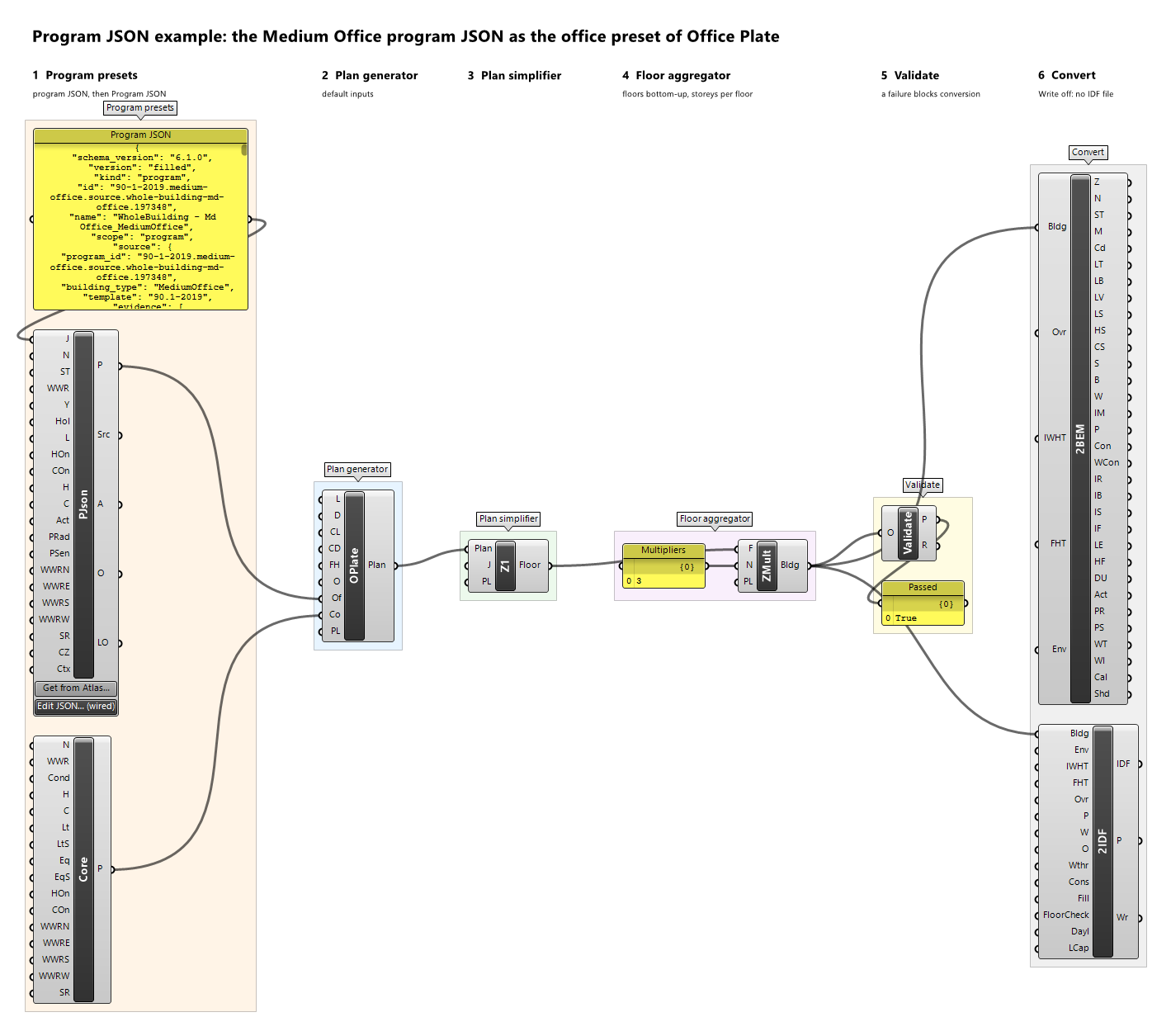
A program preset from program JSON 6.1.0 text, as atlas release 2.4.0 exports it (version filled or source): its loads, end uses, heat fractions, people, heating and cooling, hot-water temperatures, daylighting controls (carried as source data, never written to an IDF), window ratios (a dwelling's by its Context), and every schedule, expanded hour by hour on the calendar of Year and Holidays. Values that differ by climate take the Climate Zone's, and loads that apply only with a construction context need Context. The source version's unrecorded values are left out or take BEMGen's defaults, with warnings. The text is checked against the program JSON schema and the contract's rules before anything is made; the program JSON 5.4.0 of atlas releases 2.0.0 to 2.2.0 and 6.0.0 of release 2.3.0 are refused, naming the program's ID in release 2.4.0. The solve reads no file or network: connect the JSON text itself, for example from a Panel, or store it with Edit JSON or Get from Atlas at the bottom of the component, which uses the network only when clicked. Shared services, building services, exterior lighting, and what else the program cannot hold are listed in Left Out. The inputs after JSON complete or override the JSON; the result's Source records the JSON, the calendar, and every override.
Inputs
| Name | Nickname | Type | Access | Optional | Default | Description |
|---|---|---|---|---|---|---|
| JSON | J |
Text | item | no | – | The program JSON 6.1.0 text (atlas release 2.4.0, version filled or source), as one text item. Double-click Edit JSON at the bottom of the component to paste or edit the text in a window, or Get from Atlas to take a program from the atlas site (https://energy-atlas.github.io/archetype-atlas/); either checks the text and stores it as this input's value, and a wire into this input takes precedence over the stored text. |
| Name | N |
Text | item | yes | – | Preset name; descriptive only, never used for matching. Unset: the JSON's name. |
| Space Type | ST |
Text | item | yes | – | The space type the preset applies to: DwellingUnit, Corridor, Stair, Core, Lobby, Service, Mechanical, Other, Mixed, Office, Retail, Mall, Kitchen, Dining, OperatingTheatre, CleanCorridor, DirtyCorridor, ClinicalSupport, CareBedroom, CareCommunal, ActivityHall. Unset: an any-program preset, which fits every preset input of a plan generator. Right-click the input to choose one, or extract it as a dropdown. |
| WWR | WWR |
Number | item | yes | – | Window-to-wall ratio in [0, 1) used by the plan generator for every exterior wall. Unset: the JSON's fenestration (per orientation and the roof's skylight ratio), or an illustrative 0.4 when the JSON has none. |
| Year | Y |
Integer | item | no | 2007 |
The calendar year the schedules are expanded on; it must be a non-leap year, since every schedule has 8760 hours. The default 2007 starts on a Monday, as BEMGen's own presets assume. |
| Holidays | Hol |
Text | list | yes | – | Holidays of that year as MM-DD text, such as 07-04; on a holiday the JSON's holiday rules apply. Unset: no holidays. |
| Loads | L |
Load | list | yes | – | Override or added loads: each replaces the JSON's loads of its type and end use, or is added when the JSON has none, such as ventilation. |
| Heating On | HOn |
Boolean | item | yes | – | Whether the space is heated. Unset: the JSON's heating_enabled. |
| Cooling On | COn |
Boolean | item | yes | – | Whether the space is cooled. Unset: the JSON's cooling_enabled. |
| Heating Setpoint | H |
Schedule | item | yes | – | A temperature schedule (°C) replacing the JSON's heating setpoint; used only when heating is on. |
| Cooling Setpoint | C |
Schedule | item | yes | – | A temperature schedule (°C) replacing the JSON's cooling setpoint, never below the heating setpoint; used only when cooling is on. |
| Activity | Act |
Schedule | item | yes | – | An Activity schedule (W per person) replacing the JSON's activity schedule. |
| People Radiant | PRad |
Number | item | yes | – | Radiant fraction of the occupants' sensible heat, 0 to 1, replacing the JSON's. |
| People Sensible | PSen |
Text | item | yes | – | Sensible fraction of the occupants' heat, a number from 0 to 1 or autocalculate, replacing the JSON's. |
| WWR North | WWRN |
Number | item | yes | – | Window-to-wall ratio in [0, 1) of the outdoor walls facing north, true azimuth [315°, 45°) after the plan's orientation. Unset: WWR, else the JSON's fenestration. |
| WWR East | WWRE |
Number | item | yes | – | Window-to-wall ratio in [0, 1) of the outdoor walls facing east, true azimuth [45°, 135°) after the plan's orientation. Unset: WWR, else the JSON's fenestration. |
| WWR South | WWRS |
Number | item | yes | – | Window-to-wall ratio in [0, 1) of the outdoor walls facing south, true azimuth [135°, 225°) after the plan's orientation. Unset: WWR, else the JSON's fenestration. |
| WWR West | WWRW |
Number | item | yes | – | Window-to-wall ratio in [0, 1) of the outdoor walls facing west, true azimuth [225°, 315°) after the plan's orientation. Unset: WWR, else the JSON's fenestration. |
| Skylight Ratio | SR |
Number | item | yes | – | Skylight ratio in [0, 1): a zone's roof takes one skylight of this ratio × its roof area, centred in the roof's largest grid rectangle; only roofs facing outdoors, terraces included, get skylights. Unset: no skylight. |
| Climate Zone | CZ |
Text | item | yes | – | The model's ASHRAE climate zone, such as 5B, for the JSON's values that differ by climate (loads, schedules, window ratios, daylighting). Unset: the JSON's general values, with a warning when it has values by climate; Convert2IDF refuses such a program until a zone is given (the weather file's .stat file names it). |
| Context | Ctx |
Text | list | yes | – | The construction context as key=value items, such as foundation=slab, for loads the JSON applies only with that context (applies_with, the IECC dwellings). Unset: none; a JSON that needs a key is an error naming it. |
Outputs
| Name | Nickname | Type | Access | Description |
|---|---|---|---|---|
| Preset | P |
Program Preset | item | The program preset. |
| Source | Src |
Text | item | The preset's provenance: the JSON's identity and checksum, the source program, the default policy, the calendar, every override, and what was left out. |
| Assumptions | A |
Text | list | The resolutions the filled JSON records (metadata.resolutions), then the demands it records as known zeros (metadata.absent_demands, such as an accepted absence, with their filling), one compact JSON text per item. |
| Overrides | O |
Text | list | What the inputs replaced or added, one per item. |
| Left Out | LO |
Text | list | What the preset does not hold or does not apply: shared and building services, exterior lighting, water heating owned once per building, the water heaters' fuel and efficiency, loads not recorded or not in the context, fuels the equipment objects do not meter, humidity setpoints, water-use zone gains, daylighting controls (never written to an IDF), the source calendar's holiday rules when no holidays are given and its daylight saving, and the design-day rules of the schedules that have them. |
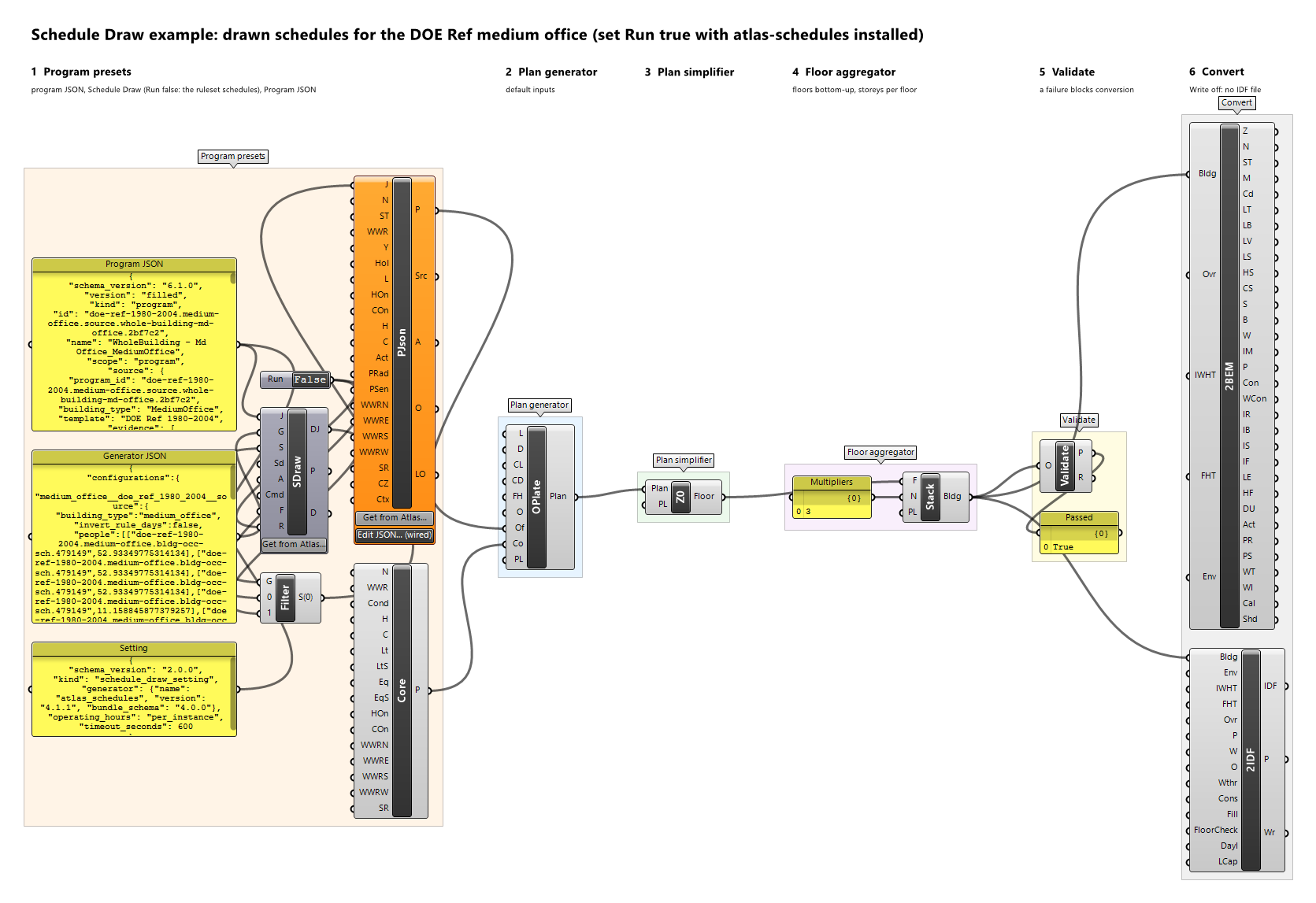
Example definitions: program-json-office.gh (canvas), schedule-draw.gh (canvas).
Program Preset
Component · nickname Preset · GUID 56ca1eba-abed-4dbb-a9a7-09d8b5806231 · exposure primary
Loads, conditioning and setpoints, people's heat, window-to-wall ratio (one, or per orientation), and skylight ratio for one space type. A conditioned space is heated when Heating On is true and Heating is connected, and cooled likewise; it needs at least one of the two.
Inputs
| Name | Nickname | Type | Access | Optional | Default | Description |
|---|---|---|---|---|---|---|
| Name | N |
Text | item | no | – | Preset name; descriptive only (reports, provenance, messages), never used for matching. |
| Space Type | ST |
Text | item | no | – | Space type: DwellingUnit, Corridor, Stair, Core, Lobby, Service, Mechanical, Other, Mixed, Office, Retail, Mall, Kitchen, Dining, OperatingTheatre, CleanCorridor, DirtyCorridor, ClinicalSupport, CareBedroom, CareCommunal, ActivityHall. Right-click the input to choose one, or extract it as a dropdown. |
| Loads | L |
Load | list | yes | – | Loads; at most one per type, end use, and basis. |
| Conditioned | Cond |
Boolean | item | no | True |
Whether the space is conditioned. A conditioned space needs a heating or a cooling setpoint, or both. |
| Heating | H |
Schedule | item | yes | – | Heating setpoint, a temperature schedule (°C); conditioned spaces only. Unset: the space is not heated. |
| Cooling | C |
Schedule | item | yes | – | Cooling setpoint, a temperature schedule (°C), never below the heating setpoint; conditioned spaces only. Unset: the space is not cooled. |
| WWR | WWR |
Number | item | no | – | Window-to-wall ratio in [0, 1) used by the plan generator for every exterior wall. |
| Heating On | HOn |
Boolean | item | no | True |
Whether a conditioned space is heated; heating is on when Conditioned and this are true and Heating is connected. |
| Cooling On | COn |
Boolean | item | no | True |
Whether a conditioned space is cooled; cooling is on when Conditioned and this are true and Cooling is connected. |
| Activity | Act |
Schedule | item | yes | – | Activity level of the occupants, an Activity schedule (W per person). Unset: constant 120 W per person. |
| People Radiant | PRad |
Number | item | yes | – | Radiant fraction of the occupants' sensible heat, 0 to 1. Unset: 0.3. |
| People Sensible | PSen |
Text | item | yes | – | Sensible fraction of the occupants' heat: a number from 0 to 1, or autocalculate to let EnergyPlus compute it from the activity and the air temperature. Unset: autocalculate. |
| WWR North | WWRN |
Number | item | yes | – | Window-to-wall ratio in [0, 1) of the outdoor walls facing north, true azimuth [315°, 45°) after the plan's orientation. Unset: WWR. |
| WWR East | WWRE |
Number | item | yes | – | Window-to-wall ratio in [0, 1) of the outdoor walls facing east, true azimuth [45°, 135°) after the plan's orientation. Unset: WWR. |
| WWR South | WWRS |
Number | item | yes | – | Window-to-wall ratio in [0, 1) of the outdoor walls facing south, true azimuth [135°, 225°) after the plan's orientation. Unset: WWR. |
| WWR West | WWRW |
Number | item | yes | – | Window-to-wall ratio in [0, 1) of the outdoor walls facing west, true azimuth [225°, 315°) after the plan's orientation. Unset: WWR. |
| Skylight Ratio | SR |
Number | item | yes | – | Skylight ratio in [0, 1): a zone's roof takes one skylight of this ratio × its roof area, centred in the roof's largest grid rectangle; only roofs facing outdoors, terraces included, get skylights. Unset: no skylight. |
Outputs
| Name | Nickname | Type | Access | Description |
|---|---|---|---|---|
| Preset | P |
Program Preset | item | The program preset. |
Schedule
Component · nickname Sch · GUID 1be96980-e9eb-4636-9ce6-4e5b6a301d1f · exposure primary
An 8760-hour schedule from a 24-hour weekday and weekend profile (holidays not modelled).
Inputs
| Name | Nickname | Type | Access | Optional | Default | Description |
|---|---|---|---|---|---|---|
| Name | N |
Text | item | no | – | Schedule name. |
| Kind | K |
Text | item | no | Fraction |
Value meaning: Fraction (0 to 1, multiplying a load's design value), Temperature (°C, for setpoints and hot-water temperatures), or Activity (W per person, the heat each occupant gives off; not negative). Right-click the input to choose one, or extract it as a dropdown. |
| Weekday | Wd |
Number | list | no | – | 24 hourly values for Monday to Friday. |
| Weekend | We |
Number | list | no | – | 24 hourly values for Saturday and Sunday. |
| First Day | D |
Text | item | no | Monday |
Weekday of 1 January. Right-click the input to choose one, or extract it as a dropdown. |
Outputs
| Name | Nickname | Type | Access | Description |
|---|---|---|---|---|
| Schedule | Sch |
Schedule | item | The schedule. |
Schedule Draw
Component · nickname SDraw · GUID 740cafea-7afe-47f4-8723-b24b6ec3c836 · exposure primary
Draws stochastic 8,760-hour schedules for a program JSON 6.1.0 with the atlas schedule generator (atlas_schedules 4.1.1 reading atlas release 2.4.0, an external command), as an optional add-on to the program's own ruleset schedules. The program JSON, the generation.json of its folder in atlas release 2.4.0 (the program setting), a schedule-generator setting, and a seed give one program JSON whose drawn schedules (occupancy, lighting, equipment, hot water, activity, setpoints, as the setting says) are annual series of 2007, with the generator, the data release, the setting, the seed, and the request's and bundle's checksums recorded in metadata.schedule_draw. The program's own version (filled or source) chooses the values the generator draws from. The loads keep their magnitudes, which the generator binds to its schedules. The same inputs and seed always give the same text. Connect Drawn JSON to Program JSON. The command runs only while Run is true; it gets files and opens no network connection of BEMGen's.
Inputs
| Name | Nickname | Type | Access | Optional | Default | Description |
|---|---|---|---|---|---|---|
| Program JSON | J |
Text | item | no | – | The program JSON 6.1.0 text (atlas release 2.4.0), as one text item. |
| Generator JSON | G |
Text | item | no | – | The text of the generation.json of the program's folder in atlas release 2.4.0 (the program setting; atlas-release-2.4.0.zip, v2.4.0/<family>/<template>/<type>/generation.json, or the folder of an earlier release the delta does not change): the generation method and ComStock configuration of each release program and the configurations of its shared services. A generator.json of an earlier release is refused. Get from Atlas at the bottom of the component stores the generation.json of the folder of the program in Program JSON, from the atlas site (https://energy-atlas.github.io/archetype-atlas/), using the network only when clicked; the atlas has none for some folders, such as the IECC apartments and the commercial folders without a sampling building type. A wire into this input takes precedence over the stored text. |
| Setting | S |
Text | item | no | – | The schedule-generator setting JSON (schedule_draw_setting 2.0.0): the generator atlas_schedules, its pinned version 4.1.1 and bundle schema 4.0.0, and optionally the roles drawn, how operating hours are shared, the occupancy option, and the timeout. |
| Seed | Sd |
Integer | item | no | 0 |
The master seed, 0 or more. The program's own seed is derived from it by the generator. |
| Floor Area | A |
Number | item | no | 100 |
The floor area the program represents, m², positive; recorded, and the extent of the generator's shared services. |
| Command | Cmd |
Text | item | no | python -m atlas_schedules |
The generator's command line, to which the request and bundle paths are added. Default: python -m atlas_schedules; with the atlas-schedules 4.1.1 wheel installed in a virtual environment, its Scripts\atlas-schedules.exe. |
| Folder | F |
Text | item | yes | – | The folder the command runs in: the atlas checkout for python -m atlas_schedules. Unset: a temporary folder, which suits an installed atlas-schedules. |
| Run | R |
Boolean | item | no | False |
Runs the generator when true. False: nothing runs and nothing is output. |
Outputs
| Name | Nickname | Type | Access | Description |
|---|---|---|---|---|
| Drawn JSON | DJ |
Text | item | The drawn program JSON 6.1.0 text, for Program JSON. |
| Provenance | P |
Text | item | The draw's provenance: generator and version, the atlas data release and its manifest SHA-256, setting and program settings by SHA-256, the values drawn from, the seed and the program's own, the request and bundle SHA-256, and each schedule replaced. |
| Diagnostics | D |
Text | list | Every error, warning, and note of the draw, one per item, including the slots not drawn. |
Example definitions: schedule-draw.gh (canvas).
Any Program Preset
Parameter · nickname AnyP · GUID 24bc6a12-ad06-4c25-bc9d-4e8318b8744c · exposure primary
Casts a program preset of any space type to an any-program preset: the same name, loads, schedules, conditioning, setpoints, and WWR, without a space type. Wire it into any preset input of any plan generator; the zones keep that input's space type, and the plan records the use in its provenance (AnyProgramPreset.<Input>).